Difference Between WiFi Access Point, Router, & Mesh System
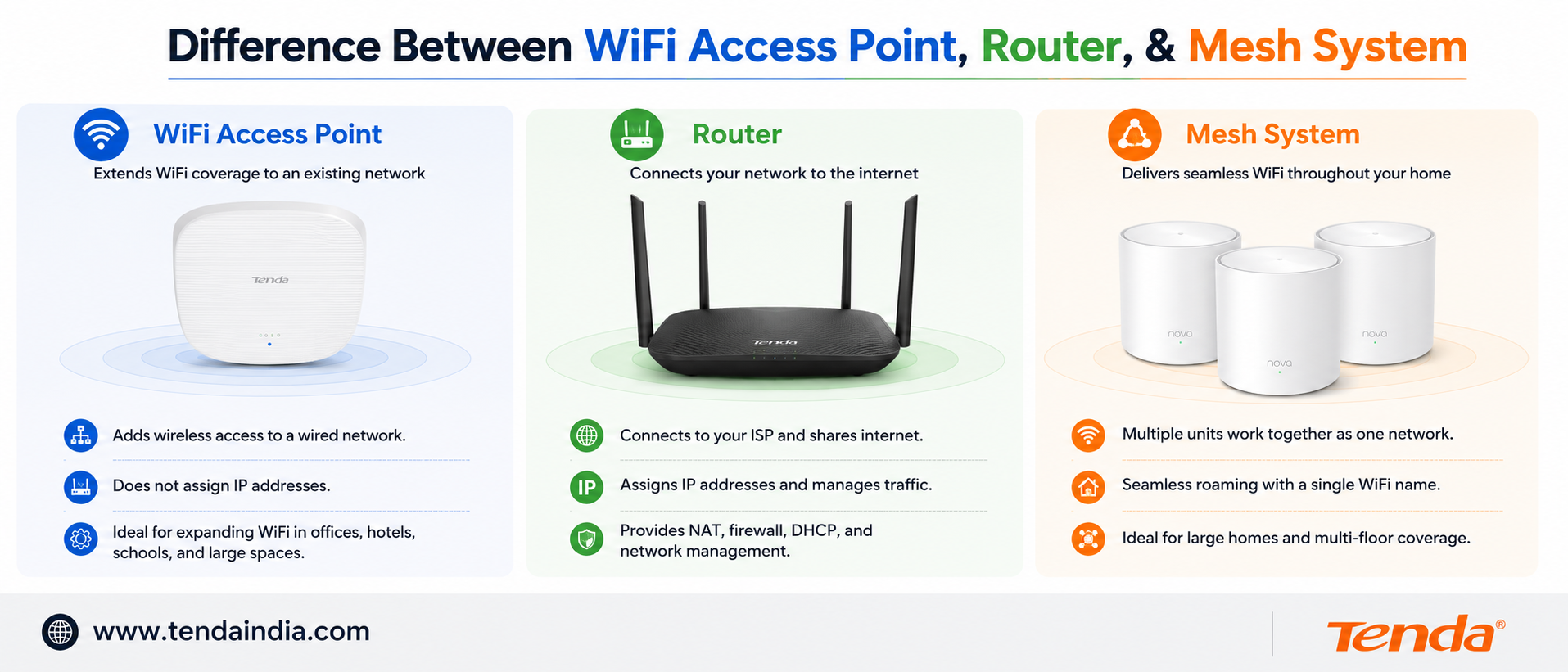
Learn the difference between a WiFi router, access point, and mesh system. Compare coverage, speed, setup, and performance for homes and offices.
Internet connectivity is central to homes, offices, hotels, and shops now, but a lot of people get stuck choosing between a WiFi router, an access point, and a range extender. All three help deliver WiFi, but they solve genuinely different problems — and picking the wrong one for your situation means spending money without actually fixing the coverage issue you started with.
This guide breaks down what each device actually does, when to use it, and how to decide between them for your specific space.
What Is a WiFi Router?
A WiFi router is the most common piece of networking equipment in homes and small offices. It connects directly to your broadband or fibre internet connection and creates a wireless network for phones, laptops, smart TVs, and tablets. Routers work well in smaller spaces where coverage only needs to reach one floor or a fairly compact area.
Routers are also the most affordable and simplest option to set up — plug it in, follow a short setup wizard, and you're online. The trade-off is that signal strength drops as you move further away or through walls and floors, which is exactly why larger homes and multi-floor offices often end up with dead zones using a router alone.
Key strengths of a router:
- Quick, straightforward setup with no extra hardware needed
- Affordable, cost-effective connectivity for typical home and small office use
- Handles everyday activities — streaming, browsing, video calls, general office work — comfortably in smaller spaces
What Is a WiFi Access Point?
An access point (AP) extends WiFi coverage into additional areas of an existing network. It connects to your main router through an Ethernet cable and creates wireless coverage from that new location — rather than creating a second, separate network.
Access points work particularly well in offices, hotels, schools, retail shops, and larger homes where solid coverage is needed across multiple rooms or floors. Because they connect via a wired cable back to the router, access points deliver consistent, stable performance rather than the gradually weakening signal you'd get by simply moving further from a single router.
The trade-off is installation: access points need Ethernet cabling run to wherever they're placed, which means some planning and, for larger deployments, professional installation. Tenda's ceiling-mount I24, I26, and I29 access points, along with the in-wall W12, are built for exactly this kind of wired, whole-building coverage.
Key strengths of an access point:
- Extends coverage reliably into rooms and floors a router alone can't reach well
- Wired connection back to the router means stable, consistent speed at the new location
- Scales well — add more access points as a space or device count grows
- Better suited to handling many simultaneous users than relying on a router's radio alone
What Is a WiFi Range Extender?
A range extender (sometimes called a repeater or booster) picks up your router's existing wireless signal and rebroadcasts it further into a weak-signal area — without needing a wired Ethernet connection back to the router. This makes it the quickest, simplest fix for a single dead zone, since there's no cabling involved.
The trade-off is speed. Because a range extender relays the signal wirelessly rather than over a cable, it generally delivers somewhat less speed than a wired access point would in the same spot, and the drop becomes more noticeable the further the extender sits from the original router.
Tenda's A10 and A19 range extenders are built for this — a fast, no-cabling fix for one or two specific weak spots in a home.
Key strengths of a range extender:
- No Ethernet cabling required — genuinely the fastest device to install
- Most affordable option among the three
- Good fit for a single, specific dead zone rather than whole-building coverage
Router vs Access Point vs Range Extender: Side by Side
| Router | Access Point | Range Extender | |
|---|---|---|---|
| Manages internet & addresses | Yes | No | No |
| Connects via | Wired (to ISP/modem) | Wired (Ethernet to router) | Wireless (relays router signal) |
| Installation | Easy | Moderate (needs cabling) | Very easy |
| Performance at distance | Drops with distance/walls | Stays consistent (wired) | Drops somewhat vs. wired |
| Best for | Core internet connection, small spaces | Multi-room/floor coverage, offices, hotels | One or two specific dead zones |
| Typical cost | Most affordable core device | Mid-range, scales with more units | Most affordable add-on fix |
How to Decide Which One You Need
Start with your router — you need one regardless. Every setup needs a router to actually manage the internet connection; the question is what to add on top of it once coverage falls short somewhere.
If you have one or two specific weak spots — a back bedroom, a home office, a garden — and the rest of your home has decent coverage, a range extender is the quicker, cheaper fix. No cabling, plug it in roughly halfway between the router and the dead zone, and you're done.
If you need reliable coverage across a genuinely larger space — a multi-floor office, a hotel, a large home, or anywhere with several rooms needing consistent WiFi — access points are the better long-term investment. Yes, they need Ethernet cabling run to each location, but that wired backbone is exactly what gives you stable, full-strength coverage in every room, rather than a signal that weakens the further it travels.
If you already have Ethernet cabling in place (common in offices, or homes built or renovated with structured cabling), access points make even more sense, since the harder part of the installation is already done.
If you don't have cabling and running it isn't practical, a range extender remains the pragmatic choice for smaller coverage gaps, even though it doesn't quite match an access point's consistency.
Frequently Asked Questions
What is the main difference between a router and an access point?
A router creates and manages the core internet connection, including assigning addresses to every device on the network. An access point extends WiFi coverage into an additional area using a wired connection back to the router, without managing the internet connection itself.
Is an access point better than a range extender?
They solve different problems. An access point needs Ethernet cabling but delivers consistent, full-strength coverage since it connects to the router by wire. A range extender needs no cabling at all but relays the signal wirelessly, which typically means somewhat reduced speed compared to a wired access point in the same location.
Can I use multiple access points with one router?
Yes — this is a standard, common setup for covering larger homes or offices, where several access points connect back to the same router through Ethernet cabling, each covering its own area.
Do range extenders reduce internet speed?
Range extenders can reduce speed somewhat compared to a direct or wired connection, since they relay the signal wirelessly rather than over a cable. Modern dual-band extenders, like Tenda's A19, handle this more efficiently than older single-band models.
Which is better for a large home: access point or range extender?
For a genuinely large home with multiple dead zones or several floors, access points generally provide more consistent, reliable coverage since they connect via wired Ethernet. For one or two specific weak spots in an otherwise well-covered home, a range extender is a simpler, more affordable fix.
Are access points better for offices?
Yes, generally — access points handle many simultaneous connected devices well and provide consistent coverage across multiple rooms, which suits typical office environments better than relying on a single router's built-in radio.
Which option costs less: router, access point, or range extender?
A router is a core, unavoidable cost for any setup. Range extenders are typically the most affordable add-on for fixing a specific weak spot, while access points cost more individually but scale well for whole-building coverage needs.
Choosing between these three comes down to the size of the space and whether cabling is already in place — not which device sounds more advanced. Explore Tenda's access points for whole-building coverage, or browse range extenders for a quick fix to a specific dead zone.