How Far Can an Outdoor CPE Really Reach? Range Explained
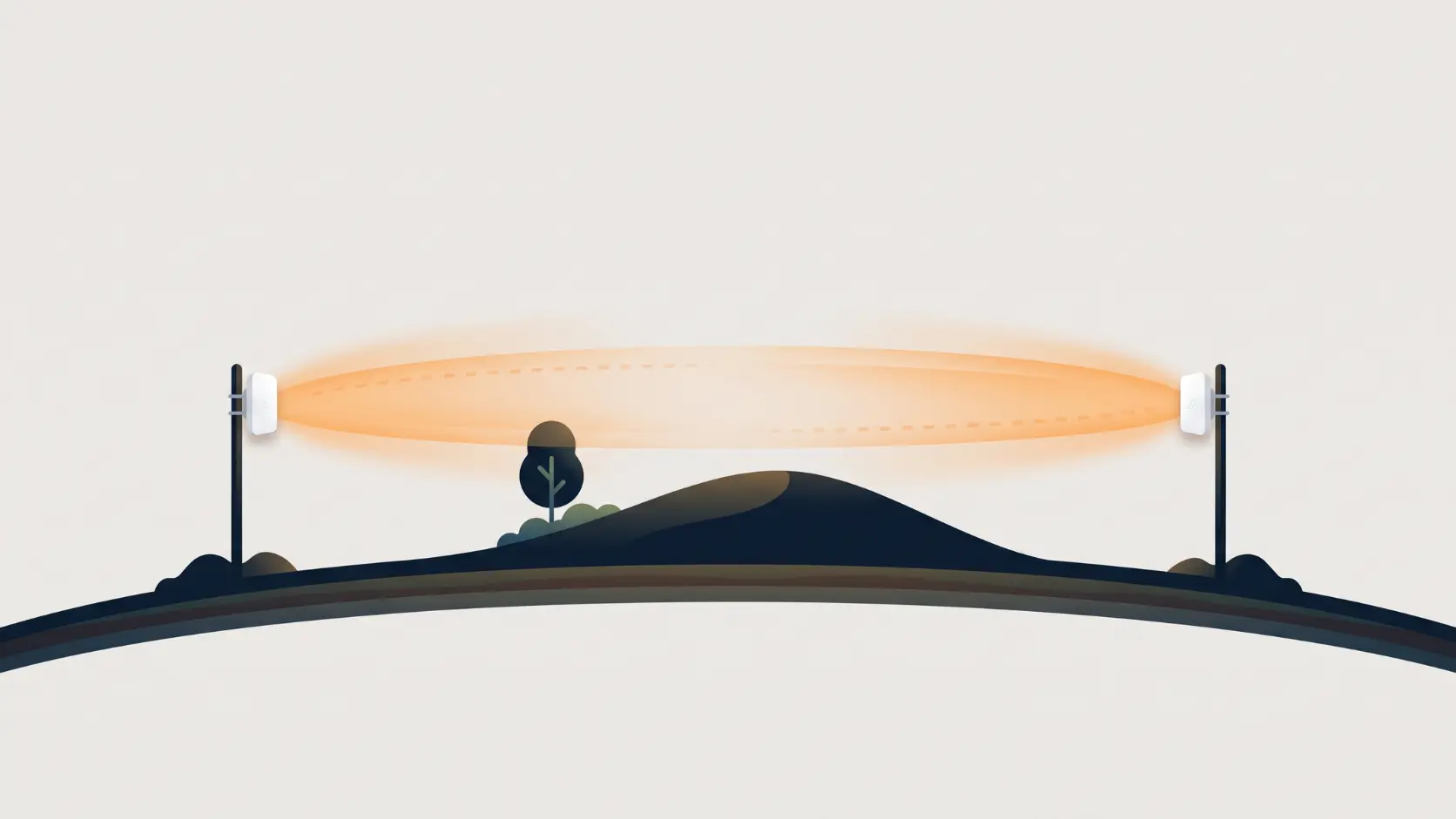
A rated 25km doesn't mean 25km. Learn what really limits outdoor CPE range, how much clearance your path needs, and how to check it before you buy.
Every outdoor CPE box has a big distance on it. 500 metres, 5 km, 10 km, 25 km. It's the number that gets people to buy, and it's also the number that causes the most disappointment, because it describes a best-case link, not your link.
That doesn't make the figure dishonest. It's measured under good conditions with a clear path, and the radios really do reach that far when the path allows it. The trouble is that "the path allows it" is doing a lot of work in that sentence. Over longer distances, the terrain, the height of your mounting points and even the curve of the Earth start to matter more than the radio.
This guide explains what actually decides how far a link will go, gives you a table of the clearance you'll need, and shows you how to check your own path in about twenty minutes before you spend anything.
What the Rated Range Actually Means
Rated range is the longest distance the device can work over, with a clear line of sight, correctly aligned antennas, and little interference. Think of it as a ceiling, not a promise.
The real question for any project is a different one: what's the longest link I can trust on this particular path? That depends on five things:
- Clearance. Whether there's genuinely open space along the whole path, not just a line you can see.
- Height. How high the antennas sit above the ground and above anything in between.
- Noise. How much other wireless traffic is competing in your area.
- Alignment. Whether the narrow antenna beams are pointed accurately at each other.
- Margin. How much signal is left over to cope with a rainy day, growing trees or a bit of drift.
The first two cause the most surprises, so they get most of the space below.
The Part Nobody Mentions: Your Signal Needs a Corridor
A wireless link isn't a laser beam. The signal travels in a stretched oval around the straight line between the two antennas. Engineers call this the Fresnel zone. It's widest in the middle of the path and narrow at the ends.
To get a link that performs as designed, the standard rule is to keep at least 60 percent of that oval's radius clear of obstacles. A tree, a hill or a building sitting inside the corridor, even if it doesn't touch the straight line, steals signal.
Over longer paths, there's a second effect: the Earth itself bulges upward in the middle of the path, and that bulge counts as an obstacle too. It's small at a couple of kilometres, and large at 20 km.
Put those two together and you get the minimum height the straight line between your antennas needs to pass above the highest thing in the middle of the path. The numbers below come from the standard formulas (60 percent of the first Fresnel zone, plus earth bulge using the usual atmospheric correction).
| Link distance | Clearance needed at mid-path, 5GHz | Clearance needed at mid-path, 2.4GHz |
|---|---|---|
| 1 km | about 2 m | about 3.5 m |
| 2 km | about 3 m | about 5 m |
| 5 km | about 5 m | about 8 m |
| 10 km | about 8 m | about 12 m |
| 20 km | about 15 m | about 21 m |
| 25 km | about 20 m | about 26 m |
How to read it: the straight line from one antenna to the other should pass at least this far above the tallest obstacle near the middle of the path. Obstacles close to either end need less clearance, because the corridor is narrower there.
Two things stand out:
- 2.4GHz needs noticeably more clearance than 5GHz over the same distance. It's more forgiving of leaves, but needs a roomier corridor.
- Past about 10 km, the Earth gets in the way. At 20 to 25 km, you're looking at 15 to 20 metres of clearance even over flat ground, which in practice means towers, tall buildings or hilltops at both ends.
What That Means in Real Life
Open farmland, 5 km, 5GHz, no trees in between. You need about 5 m of clearance at the midpoint, so antennas on 5 to 6 metre masts at each end, on flat ground, do the job.
The same link, but with 8 m trees along the way. Now you need the line to clear the trees by about 5 m, so roughly 13 m. That's a very different installation, with taller masts and a much bigger cost, even though the distance is identical.
A hostel block 3 km away across a small town, 5GHz. Clearance of about 4 m over the tallest buildings near the middle. Roof-to-roof can work, but you need to look carefully at what stands between the two roofs.
A village 12 km away, hilltop to valley. Clearance of about 10 m over the midpoint terrain. This is a hilltop job, and the longest-range models (O8 or O9) make sense, because the O6's 10 km+ rating is already stretched.
That's why a 25 km rating on a spec sheet and a 25 km link that works are two different things. The O9 can reach that far, but you need a path, and mounting points, that allow it.
Plan Well Inside the Rating
A cautious rule of thumb, and it's our suggestion rather than a Tenda specification, is to plan important links at roughly half the rated range or less, and to go further only if you've tested it. That leaves room for everything that goes wrong in real life.
| Model | Rated range | Cautious planning distance |
|---|---|---|
| O1 | 500m+ | around 250m |
| O1-5G | 1km | around 500m |
| O3 and OS3 | 5km+ | around 2 to 2.5km |
| O6 | 10km+ | around 5km |
| O8 | up to 20km | around 10km |
| O9 | up to 25km | around 12km |
That doesn't mean a link beyond those figures won't work. Plenty do, especially with good height and a clean path. It means that's the zone where you can install with confidence, and beyond it, you should expect to survey the path carefully.
One more point in favour of a bit of caution: a higher-gain antenna doesn't just reach further, it also has a narrower beam. The more you stretch distance, the more precisely you need to align, and the less forgiving the mount is to wind and drift. Our range comparison covers how each model's antenna behaves.
The Things That Quietly Shorten Range
Trees, and especially tree growth. The path you checked in March can be blocked by September. Allow for monsoon growth, and check again after the rains.
Buildings and structures near the ends. A water tank, a new floor on a neighbouring building, or a hoarding going up can intrude into the corridor.
Water and metal under the path. A lake, a river or a large sheet-metal roof can reflect the signal back and cause fading, because the reflected signal arrives out of step with the direct one.
Interference. A busy town has far more wireless noise than open countryside. Noise eats into the margin that long links depend on, which is one reason 5GHz is usually the sounder choice in built-up areas.
Rain. At these frequencies and distances, ordinary rain has only a minor effect. Water in a connector or a nudged mount is a far likelier culprit when a link drops during a storm. Our troubleshooting guide covers what to check.
2.4GHz or 5GHz for Longer Links?
2.4GHz copes a little better with leaves and light foliage, but needs more clearance, is much more crowded, and is slower. 5GHz needs a smaller corridor, is generally cleaner and is faster, but is less forgiving if the path is through trees.
For most links, particularly in towns and built-up areas, 5GHz is the better default. Choose 2.4GHz when you have a rural path with light foliage, little interference and modest bandwidth needs.
Check Your Own Path in Twenty Minutes
You don't need special equipment to find out whether a link is realistic.
- Measure the distance. Drop a pin at each end in Google Maps and measure the straight-line distance.
- Look at the ground profile. In Google Earth, draw a path between the two points and open its elevation profile. That shows the shape of the terrain between the ends, including any hills in the middle.
- Add what's on top of the ground. The profile shows ground, not trees or buildings. Look at the satellite view and add the height of anything tall near the midpoint.
- Compare with the clearance table above. If your mast heights give you at least that much clearance over the tallest obstacle near the middle, the path is realistic.
- Walk it, or look from both ends. Binoculars or a phone zoom from each mounting point will show you what a map doesn't, like a new building or a line of trees.
If you'd like a second opinion, our team can help you check a site before you choose a model.
If the Path Doesn't Work
- Go higher. Mast height is the cheapest fix, and each extra metre of clearance helps.
- Move a mounting point. A rooftop, a water tank or a nearby rise can transform a link.
- Split the hop. A relay at a third location can turn one marginal long link into two solid shorter ones.
- Change the band. Moving from 2.4GHz to 5GHz reduces the clearance you need, though it makes the path less tolerant of foliage.
- Choose a higher-gain model. It helps, but it doesn't remove the need for a clear corridor.
Frequently Asked Questions
Will the O9 really work at 25km?
It's rated up to 25km under ideal conditions. At that distance you need around 20 metres of clearance over the midpoint terrain, with a completely clear path, so in practice it means towers or hilltops at both ends. For most links, it's the right model for a long distance, not a promise that any 25km path will work.
Is a longer-range model always better?
No. Higher-gain antennas have narrower beams and need more careful alignment. For a 500-metre link, an O9 is more expensive and harder to aim, with no benefit.
Do I really need line of sight?
For these 5GHz and 2.4GHz units, yes, in practice you do. A hill, a large building or a thick stand of trees in the path will block or badly weaken the signal. A relay site is the usual workaround.
Does weather reduce range?
Only slightly. Heavy rain has a small effect at these frequencies and distances. Weather problems are usually really mounting, connector or power problems that show up in bad weather.
Can I increase range by adding a bigger antenna?
It's best not to modify the units. A better answer is choosing a model with more gain, raising the mounts, or splitting the hop with a relay.
How do I know which model fits my distance?
Measure the distance, check the path using the steps above, then choose a model rated comfortably beyond your distance. Our range comparison and installation guide will help from there.
The best way to use a rated range is as a ceiling, and the best way to plan a link is to start from the path, not the box. Explore Tenda's outdoor CPE range once you know your distance and your mounting heights.